Marine Gets Silver Star for Saving Buddy

Marine Gets Silver Star for Saving Buddy

Three days ago, staff sergeant Timothy Williams got a Silver Star award for saving a team leader and ran the length of three football fields. In July 2012 the Marines were switching from fighting to training Afghan soldiers when they were ambushed by the Taliban. His friend was shot and Williams saved him by carrying back to the helicopter. The author thinks it was a great deed. I agree with the author because I think he should be awarded this medal for his honorable behavior. An OTA student, Ian, thought it was a great deed.
3D Printing Aims for the Mainstream

3D Printing Aims for the Mainstream

Thursday, January 9th, 2014

In Las Vegas, Nevada, there a was a convention for 3D Printing. For $800, you could buy a 3D Printer from San Diego group Robo 3D that will print out a gear for an aerial drone, a gumball machine, a scooter, and a shoe. The people quoted in the article say that it should be sold to the public. The author does not have an opinion but just states the facts. I think that it should be used because it would help people. An eighth grade student, Morgan, said that it should not be sold because it is too expensive and she thinks people won’t buy it.

Mathews Still Absent, Hardwick Cleared

Mathews Still Absent, Hardwick Cleared from the Union-Tribune
January 10th, 2014

Today, we learned about two Chargers players, Ryan Mathews and NIck Hardwick. Ryan Mathews was absent from practice because he suffered an ankle injury. Nick Hardwick returned to practice. He was injured with a neck injury. This is important because they both have to play in the next game; the division game. The author is stating the facts. I think it’s a good idea that they should play in the next game. Ryan Mathews should rest so he can play again. My classmate Quin thinks Mathews should not play because he needs to rest.


Intro and Guidelines for Student Web Logs (Blogs)

Dear OTA Student:
Your personal Learning Journal is designed to help you create a record of your quality work (and your growth over a year) in the 8 OTA Core Learning Strands— Music, Science, Math, Seminar, English, Art, History, & Outdoor Ed.

The Categories available in the sidebar are set to match those 8 Strands and you should mark every post with one or more of those categories.

Why Create An Online Learning Journal?

  • Blogs are very powerful content-management systems: which means they allow you to create a beautiful, multimedia record of a year’s worth of work and retrieve it instantly when you need it (by just clicking on the category of posts you want to see or by using the SEARCH Box to find all posts with the word “music” or “football” etc.)— but only if you use the Categories!
  • Publishing your work on your Web Log ( = “Blog“) will often be the last step in earning a Passing Grade on a Project, or extra credit.
  • When you are ready to apply to high school (choice programs like IB or an art magnet, or a private school) your Blog will be a Portfolio of all your best work that might just help you get in.
  • You work hard to earn a passing grade on your OTA Projects, why throw them away? Now you can keep them, share them, go back and improve them as you learn more. If the work’s worth doing it’s worth keeping.

To Create Your Learning Journal You Will Have to Learn to:

  • Scan, convert, and upload Text and Images (working with .doc, .pages, .pdf, .txt, .jpb, .png, inspiration, etc. files). Note: before you can upload word or pages documents you must convert them to pdfs or images.
  • Create Slideshows and manage image databases.
  • Edit and convert movies and music or sound files (working with .mov, .wmv, .qt, .mp3 etc. files), and
  • Use the WordPress dashboard (content management system) to create, edit, categorize, and publish posts)

Things You Can Change On Your OTA Blog:

  • The Header–from pre-selected photos or you can customize it with your own photography or artwork.
  • The Picture of the Week–you add a new picture every week… from your own or classmate or teacher’s photos or scans or artwork.
  • The Background image–from preselected photos or your own photography or artwork, or a 200 x 1000 pixel collage of other artwork (See “fair use” below)

Things You Can’t Do:

  • Upload copyrighted images from the web (use your own photographs or artwork–or find public domain images)
  • Upload violent or obscene photos, images, or text.
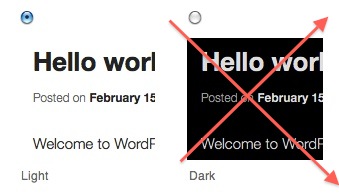
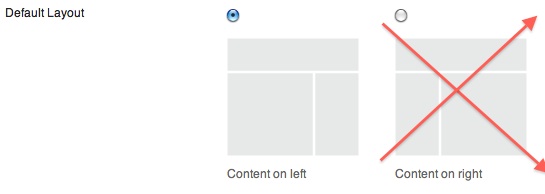
  • Change the Theme Options. Why not? “Dark” makes your blog illegible; Content right ruins the left border of text, making it jagged and difficult to read; “No Sidebar” removes Categories and makes it impossible to find your content!

Does every post on your Blog have to be 100% your original work?

Continue reading →