How to Get the Best out of “ThatQuiz”: Quiz Settings, Ideal Number of Problems, Time Pressure, etc.

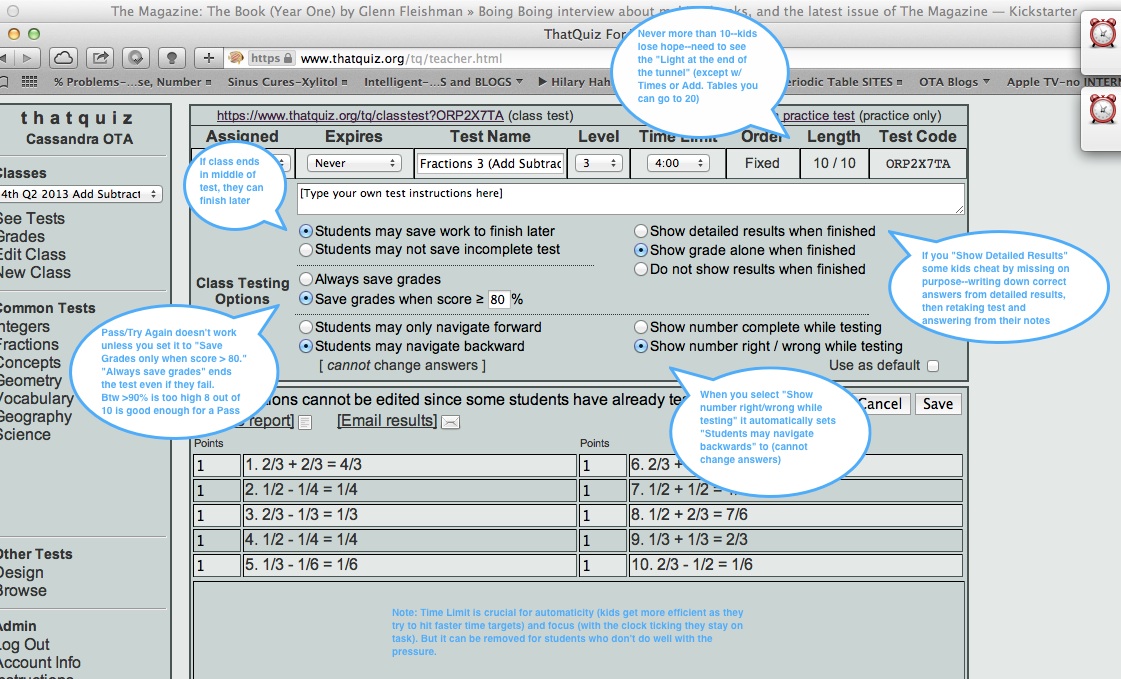
Ideal Settings for ThatQuiz Tests. (vs defaults, see below jump*)

ThatQuiz Correct Test Settings-Annotated

How do you decide how to set TIME LIMITS? Play the Quiz through and figure out how your average time/problem, then add more time to take into account students age.

More more on time limits and time per problem conversions, see Post:

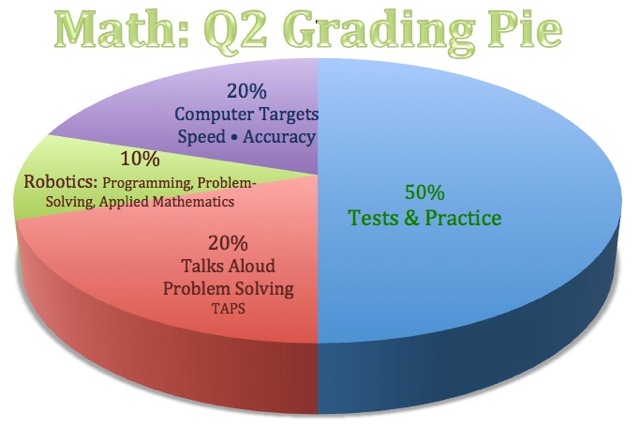
In order for kids to take computer learning TargetScores seriously, we have to give computer Project Tree a slice of the grading pie.

Math Q2 Grading Pie-Robotics

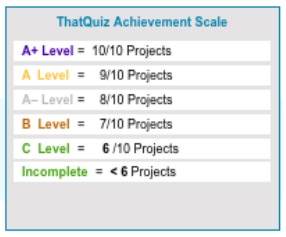
ThatQuiz TargetScores- Math Grading Scale SAMPLE

… and an (achievement based) Grading Ladder so they can grade themselves as they progress up the Project Tree.

… and we need to EXPLAIN to them WHY we’re asking them to do ThatQuiz (the Talent Code author calls this “Ignition“–motivate learners first, get them to believe in your method, before you ask them to start the hard WORK.

* Continue reading →

ThatQuiz How-To Video: Reusing Last Year’s Tests With a New Class of Students

(“Set up for streaming” may not have been selected on this video when it was exported (created by screen capture in QuickTime–check on that)

  • How to Set up a New Class* and Import incoming students into your Roster (after which you’ll always create new Classes from that Class and see an option to import the kids on that Class’s Roster)
    • * Note: each ThatQuiz “Class” is = a Project, with 10 ThatQuiz Quizzes of 10 Problems, max, each.
  • then Create New “Blank” ThatQuiz Project (“Class“) for the new group of students (e.g., using the title: 5th 2013 Q1 Times Tables Review” you create a new Class),
  • Then Share last years quizzes (only 10 at a time can be shared, which is why we never go over 10 quizzes in a Project) with the new Project-Class.

How to Make (and Post) a Live Inspiration Project Tree for ThatQuiz or any subject!

Step 1: Use ThatQuiz Project Tree (aka: Computer TargetScores TEMPLATE: please use the Template: why? the Template helps you set up a Visual Learning Path (prepared, progressive, path to excellence), a Grading Scale (Achievement Based), it has ten Projects (not too many for kids to internalize), including branch projects (reminds you to set challenges, or review projects for you top students), and parents with children in multiple grades will recognize the template and know how to use it), add live links to your ten ThatQuiz webpages

Step 2: Export Your Inspiration Project Tree as a Web Pages: “Diagram or Mind Map Page”  (not a Site Skeleton)

Step 3: Use a FTP program to upload your exported Inspiration Web Page (that will be a folder with a png and a separate html doc) to the html folder on the OldTownAcademy web host server:

  • For example, “Transmit” is an ftp program–looking for free one!
  • otacharter.org is our website
  • ftp@otacharter.org is the address for your ftp upload
  • oTa!92110  is the password for OTA server access

Step 4: Open the html file using. e.g., Google Chrome, copy the source code
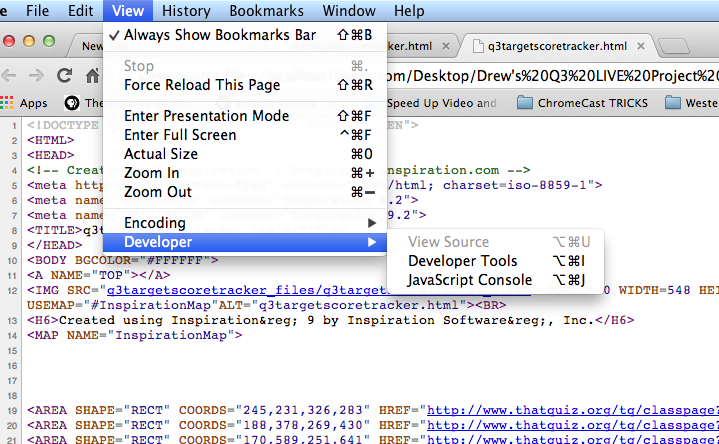
Screen Shot 2014-02-04 at 7.07.30 PM

Step 5: Insert Code into the TEXT Tab of a new WordPress Post

Step 6: Add a / mark here:

Where to put Forward Slash in Live Project Tree html Code

Step 7: Save, Publish, Preview… check your links…

See sample below! ↓

==================================

Sample of a Live ThatQuiz “Project Tree” from 4th Grade:

Click Project Tree Links (e.g. Add-Subtract Whole Numbers) to open ThatQuiz Projects

*** *** ***Intro to ThatQuiz-Games that Make You Strong

The goal of ThatQuiz math challenges is to help students make basic math skills “Automatic” so they can concentrate on solving word problems in the Saxon Math Text and the TAPS Project Trees (Think Aloud Problem Solving)…. and real math problems from Science, Robotics, Cooking, Carpentry, Money, and more!

*  To start using ThatQuiz… Continue reading →