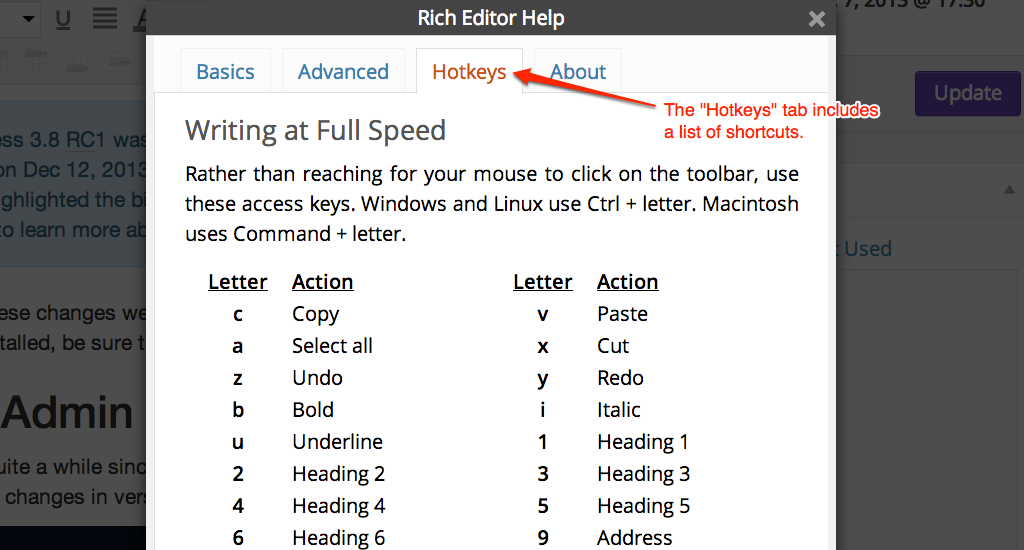
List of WordPress Keyboard Shortcuts for Writing at Full Speed

Problem with Safari

Unfortunately, Safari has a different behavior for cmd + 1, cmd + 2, etc. They open a website from your Favorites Bar. There is no default way to turn off this functionality, and even deleting all your favorites doesn’t work. Open source to the rescue. There’s a plugin you can add to Safari to change the default behavior to switching tabs. I haven’t tested to see if this will allow the Headings shortcuts to work or not, so if you use Safari & are willing to give this a shot, please let us know.

If you know of any WordPress keyboard shortcuts that we left out, please let us know in the comments.

via List of WordPress Keyboard Shortcuts for Writing – WordPress Hotkeys.

Subscribe2 Guide – 2 Ways to Unsubscribe from OTA Blog

How to Unsubscribe from Subscribe2

You can unsubscribe from Subscribe2 as follows:

1. Registered Subscribers

There are three options for registered subscribers to unsubscribe from a blog:

If Subscribe2 plugin is activated on their own blog (Plugins > Installed)

Go to Users > Subscriptions

Click Unsubscribe next to the correct blog name

In the blog dashboard they want to unsubscribe fro

via Subscribe2 Guide – WPMU.org.

Plug-in Wish List: Find Good Forms Plug-in (Contact 7 conflicts with slideshow); Drop Box Plugin

  •  Shared Checklist Plugin? (Trello-like!) for Teacher Training/Goal Setting/ Tracking? is there such a thing through WordPress?
  • We really really really need a good online report card/reporting program that supports Project Trees, Pass/Try Again grading, etc. ie VISUAL GOAL-SETTING & PROGRESS-TRACKING
  • Cell Phone/Tablet recognition plug-in (Mobile-Ready)

“Subscribe2 Form” is broken!

Also: Unsubscribe has also never reliably worked: parents who subscribe to follow the lottery, for example, then try to unsubscribe when they don’t get a place… can’t do so (or at least not easily since they ask us and we do it manually)

======”Student Blogs are Live! Please Subscribe” ======

Dear Parents or Guardians,

Please subscribe to the blog to follow along as your child completes projects in the 8 OTA Learning Strands!